Racquet sports
Tennis rallies, padel volleys, pickleball points.
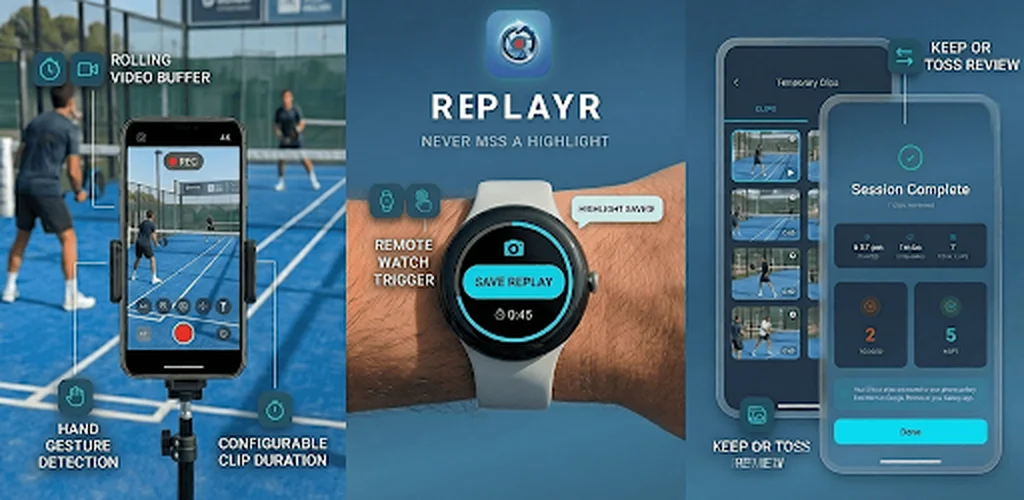

ReplayR is your sideline replay camera. Save only the seconds worth keeping.
ReplayR is a sideline replay camera app for Android and Wear OS that keeps a continuous rolling video buffer on your phone. Mount your phone, let it loop, and save the last 45 seconds (up to 12 minutes on Pro) with a tap, your smartwatch, or an open-palm gesture. At the end of the session, swipe right to keep, left to toss, trim in the built-in editor. On Pro, turn on the delayed preview to watch yourself a few seconds late without touching the phone, and tap Analyze to step through a saved clip one frame at a time and draw on the frame that matters.
Short answer. ReplayR is a sideline replay camera for Android and Wear OS. It keeps a continuous rolling video buffer on the phone, so nothing is recorded permanently until you decide it matters. Save the last 45 seconds, or up to 12 minutes on Pro, with a tap, a Wear OS watch, or an open-palm gesture. On Pro, the delayed preview turns the same screen into a live delay mirror: the preview plays what the camera saw 5, 10, 15 or 30 seconds ago while recording keeps running, so you can train alone and watch the rep you just did. Nothing is uploaded.
Tripod, fence wedge, lean against a wall.
The rolling buffer loops over the last 45s–12min. Turn on the delayed preview (Pro) to watch yourself 5–30s late.
One tap, watch, Bluetooth camera remote, volume button, or open-palm gesture (Pro).
Swipe-to-keep at session end, trim, mute the audio if you are sharing it (Pro), save.
Video analysis has two halves: getting the moment on camera, and breaking it down afterwards. Most sports performance analysis platforms are built for the second half and assume you already have the footage, which is why they hand you a full-session recording to scrub through. ReplayR owns the first half, and since August 2026 it covers the part of the second half that actually settles arguments: frame-by-frame review and drawing on a frame, on-device, with no account.
Rolling buffer, one-tap save, swipe-to-keep review, trim. Everything that has to happen while the session is still running.
The Analyze button opens a fullscreen player: step one frame at a time, hold to run a sequence, scrub with frame precision, slow to 0.1×. Then draw on the frame and save or share it. See how the analyzer works.
No account, no upload queue, no per-coach seat. The clip and the annotated still go from the buffer to your storage to whoever you choose to send them to. Side-by-side comparison and voice-over still belong to dedicated analysis apps.
Deciding between the two? ReplayR vs OnForm compares rolling-buffer capture plus on-device frame analysis against a full subscription analysis platform, and best slow motion analysis apps 2026 covers the wider field.
Filming yourself has always cost you the session: record, stop, walk to the phone, watch, walk back, start again. Delayed preview removes every one of those steps. Turn it on and the camera screen plays what the lens saw 5, 10, 15 or 30 seconds ago, on a fixed lag, continuously, while the rolling buffer keeps recording underneath. Do the serve, the trick, the rep, then look up: it is already playing. This is the delayed mirror model, built into the same app that keeps the clips.
The delayed picture is a second player reading the footage the buffer has already written. The buffer, the save trigger, the watch and the gesture all behave exactly as before, so turning the mirror on costs you nothing.
A pill on the camera screen cycles 5s, 10s, 15s and 30s, and the same setting lives in Settings. Change it mid-session and the picture re-anchors without stopping anything. Short skills sit around 10–15s; see optimal replay delay by sport.
A save always writes the last N seconds of real time, not the delayed picture you are looking at. The app tells you so the first time you turn the mode on, so the two never get confused.
Android, in the seamless recording mode. The classic recording mode stores footage in blocks too long to replay a few seconds late. The mirror is video only, with no sound. Setting the delay to 0s removes the pill entirely, and switching it off does not need Pro.
Part of the one-time Pro unlock. Background reading: delayed mirror apps explained, how to film yourself training alone, and video delay apps for coaching.
Some calls hinge on a single frame: a no-ball, a line call, a foot fault, the exact moment of contact. Tap Analyze on any saved clip and ReplayR opens a fullscreen player built for that. Step forward or back one frame at a time, hold a step button to run through a sequence, or drag across the video to scrub with frame-level precision. A live counter shows exactly which frame you are on.
Single-frame stepping in both directions, hold-to-run for a sequence, and a drag-to-scrub track with frame precision. The frame counter tells you where you are, so you can go back to the same frame twice.
Playback now goes to a tenth of real speed. The previous floor was 0.25×, which is fine for a bar path and too fast for an impact position.
Keep a still at the clip's full recording quality straight to your photos, or send it to anyone through the usual Android share sheet. Useful for a coaching note, or for settling an argument.
On the analyze screen the volume keys move one frame at a time, so you can work through a sequence without your fingers covering the picture.
Pause on the moment that matters and tap Annotate frame. Draw freehand to trace a swing path or highlight footwork, drop a straight line to check alignment, and add short labels right where they belong. Four colours, three sizes, undo and clear-all while you work.
Saving or sharing an annotated frame gives you one image with the markings baked in, at the clip's full recording quality. Nothing to combine afterwards, and it looks the same in any app you send it to. Closing the drawing screen puts you back on the exact same frame, ready for the next one.
Both features are part of the one-time Pro unlock. Full walkthroughs: frame-by-frame video analysis on Android and drawing on a video frame.
Every competing video analysis app is a cloud platform. Footage uploads to someone else's server, sits behind an account, and stays there after you stop paying. ReplayR is on-device only: no account, no upload, no analytics SDK, no clip leaving the phone unless you explicitly send it. That is a structural difference, not a setting you can toggle on the other apps.
Nothing is written to your gallery until you keep it, and nothing is transmitted at all. There is no server-side copy to request, audit, or delete, because one was never made.
Coaching youth athletes means answering to parents and safeguarding officers. "It never leaves my phone" is a materially easier conversation than explaining a third-party cloud. It does not replace your club's media-consent policy, see the ethics guide.
Pool decks, indoor courts, rural pitches. A training session at the edge of coverage behaves exactly like one on wi-fi, because nothing is ever waiting to sync.
Coach's Eye was retired and took its cloud libraries with it; the name has since been relaunched by an unrelated company, which does not bring your old clips back. Clips saved from ReplayR are ordinary MP4 files in your own storage, readable by anything, dependent on nobody.
More on the studio-wide position: privacy-first apps at Mobile Squad.
The phone films. You are rarely standing next to it. ReplayR is built so the save trigger reaches you wherever you actually are during a training session, which is the part cloud analysis platforms leave unsolved.
The capture device. Mount it, start the buffer, black the screen out with stealth mode. The phone never locks while it records. Capture up to 8K on Pro.
Full companion app plus a Tile and a Complication, so saving is one tap from your watch face. Start, end, pause, save, change clip duration, all from the wrist. Connects over Bluetooth, no cell signal needed.
No smartwatch? Pair a cheap selfie shutter remote with the phone and press it to save the replay, from across the court. The phone's volume buttons do the same while the camera is recording. Free, Android. How it works.
Open-palm gesture save (Pro) triggers from in front of the lens, for when you are the one being filmed and your hands are chalked, gloved, or holding a racquet.
iOS is on the roadmap and not yet available. Android and Wear OS are the platforms that work today.
Tennis rallies, padel volleys, pickleball points.
Surf takeoffs, ski runs, skate tricks.
Pickup games, practice drills, coaching reviews. One training session, a handful of clips worth keeping. Sideline setups for youth soccer coaches, rugby coaches and hockey coaches.
First steps, backyard goals, zoomies, the unrepeatable stuff.
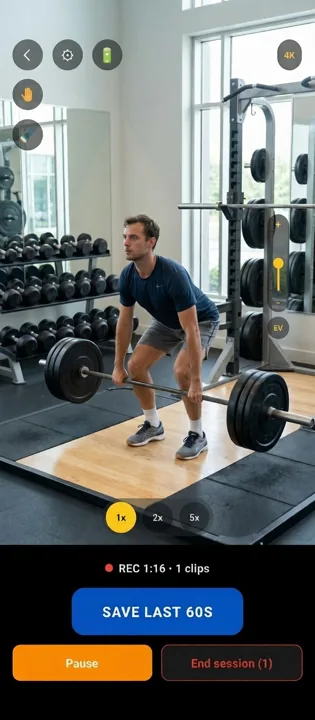
Lifts, swings, technique work. Replay yourself without a coach.
Pitch-black screen while buffering saves battery for long sessions.
Running an instant replay system for a coaching session works the same in every sport, only the buffer length changes: 90 s to 3 min for a youth soccer attacking phase, 3 min for a rugby passage of play, 90 s for a hockey shift. Every sport guide is listed on the sports page.
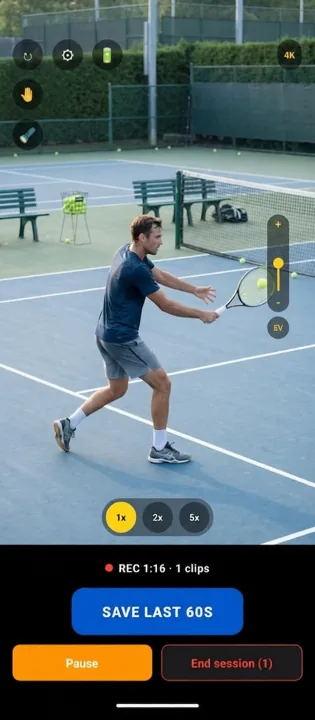
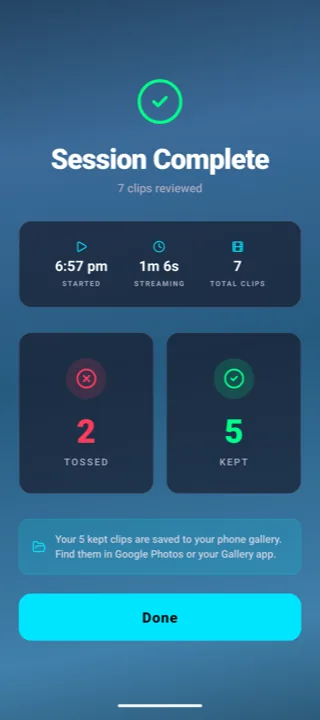
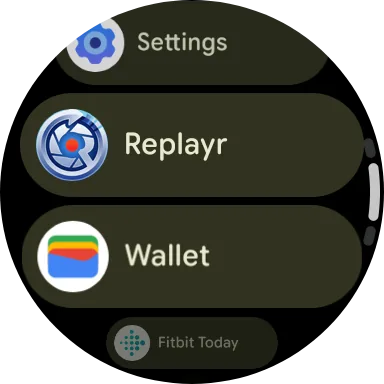
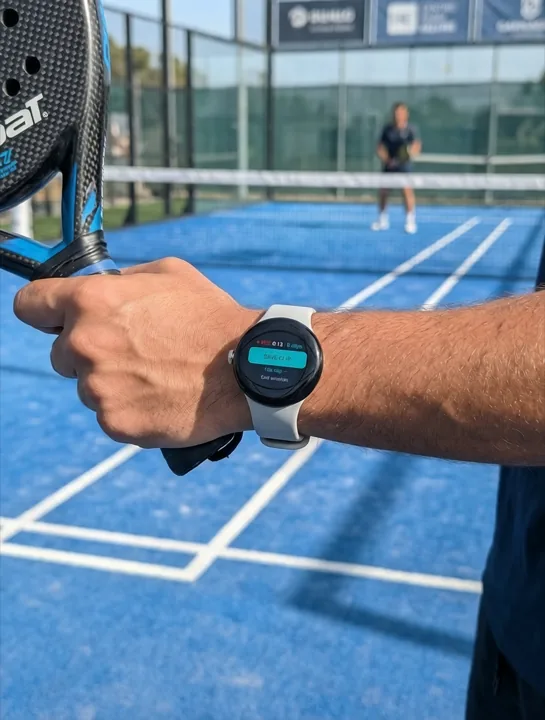
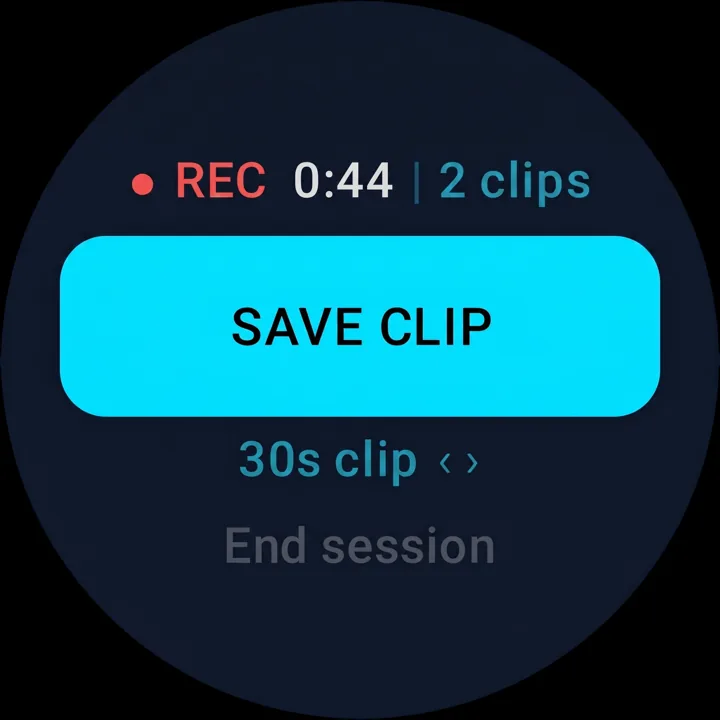
Sofia coaches junior tennis players. She used to record full 90-minute sessions and spend 20 minutes scrubbing for useful clips. Here's what her Tuesday practice session looks like now.
Sofia props her phone against her ball cart with a small tripod wedge, aimed at the baseline. She opens ReplayR, taps Start buffer. The rolling window is set to 90 seconds, enough to cover a full rally exchange. The screen goes dark (stealth mode). The buffer is running.
One of her players has a backhand that breaks down under pressure. The drill just produced a perfect example, the exact moment the elbow drops. Sofia glances at her Wear OS watch and taps Save. The last 90 seconds are written to local storage. The buffer keeps running. Play continues without interruption.
She saved 8 clips across two hours. ReplayR shows them in the swipe-to-keep queue: swipe right on the good ones, left to discard. She keeps 5, trims two in the built-in editor to show just the stroke, and shares them via Quick Share. No login. No upload queue. Two minutes total.
The 90-second buffer never fills her storage. Only the clips she explicitly kept were written to disk. The two hours of practice that produced nothing worth saving? It was never stored. Her phone has the same free space it started with, minus five clips.
ReplayR is a capture tool. It's deliberately not a full analysis platform, understanding the edges helps you decide if it fits your workflow.
Clips stay on your device until you share or export them. There's no background upload to a cloud library. This is intentional, it means no accounts, no tracking, no clips leaving your device without your say-so.
Pro now covers frame-by-frame stepping and drawing on a frame, but the drawing lives on a still image, not on the moving clip. Comparing two athletes in a split screen, overlaying one clip on another, and recording a voice-over track are still jobs for a dedicated analysis app.
If you need a complete, uninterrupted recording of an event, every minute, every moment, ReplayR isn't it. The rolling buffer discards footage that wasn't explicitly saved. For archival full-session recording, use your phone's native camera app.
ReplayR is Android-first today, with a full Wear OS companion. iOS support is on the roadmap but not yet available. If you and your athletes are split across platforms, Android is the side that works today.
ReplayR loops over the last 45 or 90 seconds (3, 6, or 12 minutes on Pro). Older footage is overwritten, only the last buffer length is stored until you tap save.
No. Recordings stay strictly on-device. No cloud uploads, no accounts, no tracking. Nothing is written to your gallery until you explicitly keep it.
Yes. Start, end, save, pause, change clip duration, all from your wrist. Includes a Wear OS Tile and Complication for one-tap save from any watch face.
Yes, on Android, free. Pair any Bluetooth camera shutter remote (the small selfie remotes) with the phone, start the buffer, and press the button: ReplayR saves the replay at the clip length you picked and the phone vibrates to confirm. The phone’s own volume buttons do the same while the camera is recording, and work normally everywhere else. Turn it off with Remote shutter in Settings. Setup and remote buying tips: save a replay with a Bluetooth remote.
Yes, on Pro. Turn on Delayed preview and the camera screen stops showing the present: it plays back what the lens saw 5, 10, 15 or 30 seconds ago, while the rolling buffer keeps recording underneath. Serve, land the trick, finish the rep, then look up and watch it, with no saving, no replaying and no walking back to the phone. Pick the delay from the pill on the camera screen or from Settings, and change it mid-session without stopping anything. Two things to know: saving is unchanged, a clip still captures the live footage rather than the delayed picture on screen, and the mirror is video only, with no sound. It runs on Android in the seamless recording mode; the classic recording mode stores footage in blocks too long to replay a few seconds late. Setting the delay to 0s switches the feature off and takes the pill off the camera screen, and that one option is not Pro-gated. More on the model: delayed mirror apps explained.
No. Pro is a one-time unlock, longer buffers, longer clips, capture up to 8K, hand-gesture save, the delayed preview mirror, frame-by-frame analysis, drawing on a frame, muting a saved clip, and bin restore.
Less than full-session recording. Stealth mode keeps the screen pitch-black while buffering to save battery on long sessions.
No. ReplayR keeps the screen awake while the camera is recording, so the phone never auto-locks and the buffer never stops halfway through a session. It is on for everyone, free tier included, with nothing to set up. For long sessions, turn on stealth mode as well: the screen goes pitch-black to save battery, but the phone still stays unlocked and recording.
Yes, on Pro. The Analyze button on the review screen opens a fullscreen player built for close inspection: step forward or back one frame at a time, hold a step button to run through a sequence, or drag across the video to scrub with frame-level precision, with a live counter showing which frame you are on. Playback slows to 0.1×, and the volume keys step one frame at a time so your fingers stay off the picture. Any single frame can be saved to your photos or shared, at the clip's full recording quality. Side-by-side comparison and voice-over still belong to dedicated analysis apps such as OnForm. Full walkthrough: frame-by-frame video analysis.
Yes, on Pro. Pause on the frame that matters and tap Annotate frame: freehand for a swing path or footwork, a straight line for alignment, and short text labels where they belong. Four colours, three sizes, undo and clear-all. Saving or sharing gives you one image with the markings baked in at the clip's full recording quality, and you come back to the exact same frame in the analyzer. Full walkthrough: drawing on a video frame.
Yes. The rolling buffer records the phone’s camera microphone, so a saved clip keeps the sound that was around when the moment happened, and you can remove that sound afterwards. Open the clip, tap Edit, and switch the Audio row to muted (Pro). The preview goes silent as soon as you tap it and the audio track is stripped from the file when you confirm, so the shared MP4 has no sound at all rather than sound turned down. Deciding after the clip is saved is the point: sideline audio picks up other people’s children by name, parents’ commentary, coaching you would not want quoted, and music over the facility speakers. Muting is permanent for that clip, so keep a copy first if the sound might matter, and if you never want audio at all, say no to the microphone permission: ReplayR records anyway, the clips simply have no sound, and a “No sound” tag in the top bar shows it (tap the tag to turn sound back on). See recording ethics in sports facilities and the full FAQ.
Keep the clip at the end of the session, trim it in the built-in editor, then share videos through whatever you already use, Quick Share, your team chat, email, or a messaging app. There is no upload step and no link that expires, because the file is on your phone rather than on a server. The full walkthrough, including slowing a clip down before sending it, is in how to share slo-mo clips with athletes.
Mount, buffer, save. End-to-end workflow in 8 steps.
Rolling-buffer capture vs full-session analysis. Side by side.
The rolling-buffer and replay apps coaches use, compared.
Retired by TechSmith, relaunched by someone else: what to use instead, without a subscription.
Rolling-buffer capture vs subscription analysis platform.
Two delay models compared: BaM's iOS-only feed vs ReplayR's buffer plus its own 5-30 s delayed preview.
Rolling buffer length, free-tier quality, watch and gesture save, subscription vs one-time unlock.
The closest rolling-buffer rival on Play: buffer length, save triggers, review flow.
The 60 second iPhone time shift camera, last updated in 2017, and its Android alternative.
Cricket-first review cam with frame-by-frame vs general sideline capture with a longer buffer.
Delayed mirror feed vs triggered rolling buffer, and when to run both.
The niche incumbent compared: a subscription or a large one-off licence vs a one-time unlock, and Android parity.
What happened in 2021 and what to use in its place now.
Capture, analysis, and delay apps on Android, compared.
Continuous delay vs replay-on-demand, and how ReplayR Pro runs both.
The Analyze player: single-frame stepping, 0.1× slow motion, saving a still.
Freehand, straight lines and labels, baked into one shareable image.
A $10 selfie shutter remote or the volume buttons as the save trigger, no smartwatch needed.
Storage, battery, Wear OS, formats, privacy, all answered.
Fourteen sports and the buffer length each one needs. One app, no modes.
One-time unlock per device instead of per-coach monthly seats.
90 s covers a full shift. Save from behind the bench with your watch.
3 min reaches back past the try to the phase that caused it.
45 s holds a whole rally. Approach and block timing at 0.25×.
Run-up, delivery and shot in one buffer. Nets sessions of any length.
3 min holds a full series of downs, huddles and play clock included.
45 s buffer fits every rally. Watch save between points.
Touchline capture, watch save, on-device only, safer for U-18.
Open-palm save mid-flow. Endless rehearsal, fixed disk usage.
Vault, beam, bars, floor, save every skill before the next gymnast salutes.
BJJ, MMA, Muay Thai, judo, boxing, replay every round, every roll.
Replay every start, turn, and sprint block on the wall or at the line.
Down-the-line and face-on swing capture, slow-mo review by the bay.
Cage capture, watch save between pitches, slow-mo at the plate.
Side-on at the rack, palm-gesture save, bar path at 0.5×.
Baseline tripod, save on the make, release review at 0.25×.
No coach behind the tripod: palm or watch save, review between attempts.
Make or bail: 45 s buffer, palm save on the roll-away, 0.25× on the landing.
Gait and movement screens: watch save with both hands busy, patient footage never leaves the phone.
A whole gym floor: camera per rack, athlete-triggered saves, review in the rest interval.
Handheld and CRT runs on a phone: save the PB after the final split, up to 12 min back.
Capture → trim → 0.25× → Quick Share. Two minutes, zero cloud.
Mount, frame, and save your own reps hands-free, no cameraman.
What still works offline, plus power and storage planning.
Exact distance, mount height, and lens to fit your court, mat, or drill in frame.
See effective playback fps and how slow you can go before it stutters.
How many saved clips fit on your device at your recording resolution.
Log successful and failed reps per drill, track trends, and identify video review priorities.
Predict how long your phone lasts as a sideline replay camera at any resolution.
Hours saved mastering a skill with instant replay vs traditional coaching feedback.
Annual hours saved by rolling buffer vs scrubbing through full-session recordings.
The best buffer length and review delay in seconds for each sport, with the reasoning.
What cognitive science says about instant replay and skill acquisition speed.
Consent rules, GDPR, and best practices for coaches using sideline cameras.
BJJ, MMA, Muay Thai, judo, boxing, what coaches need from a sideline replay camera.
How broadcast-grade rolling buffer tools became a free phone app.
Adoption rates, outcomes data, and what barriers remain across sports and age groups.
Continuous delay vs rolling buffer, and setup recipes for gymnastics, dance, weight room, and sideline use.
Download ReplayR and start capturing only the parts worth keeping.








 All apps on Google Play