App 05 · Developer tools · Android (iOS soon)
Firepulse icon

Firepulse

Firepulse is your Firebase projects in your pocket. Read-only.

Firepulse is a read-only mobile console for Firebase projects. Sign in with Google, browse every project on your account, and check the metrics that matter — Firestore reads/writes, Crashlytics, Analytics, hosting traffic — without opening a laptop. Firepulse is not affiliated with Google.

  • Read-only OAuth scopes — cannot modify your projects
  • Global dashboard across every project on your account
  • Side-by-side project compare
  • Server-side daily / weekly push digests (no battery drain)
  • Home-screen widgets for key metrics
  • Crashlytics and Analytics deep-dive per project
  • OAuth refresh tokens encrypted with Google Cloud KMS
  • Demo project for evaluation without granting scopes
Google Play Website Read-only OAuth scopes iOS coming soon
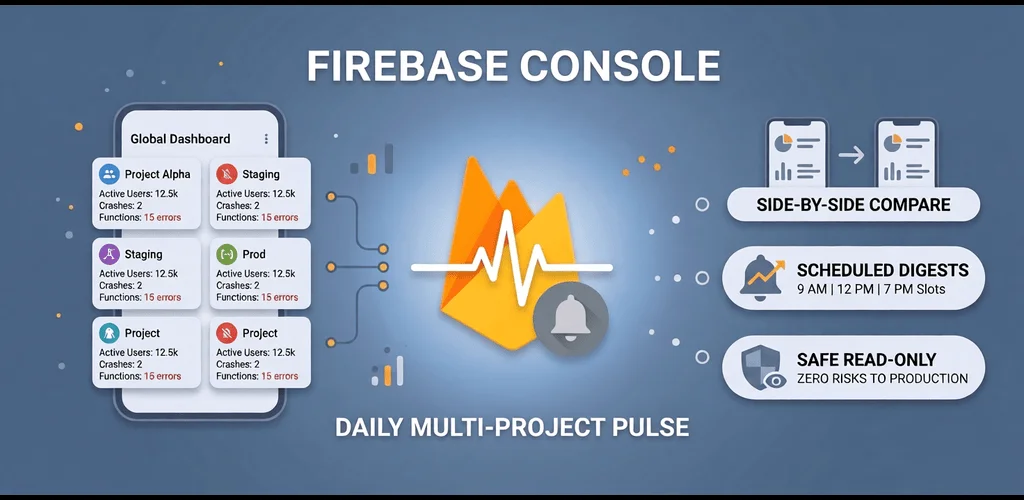
Firepulse feature graphic

What can you do with Firepulse?

Global Dashboard

One tile per project, fit-to-screen grid, fullscreen wall-display mode. Pick any metric — active users, crash-free rate, function invocations, Firestore reads, hosting bandwidth, p95 latency — and see it across every project at a glance.

Project Directory

Every Firebase project on your Google account. Sortable by name, status, or starred. Search, refresh, open.

Per-project deep dive

Overview, Analytics, Backend, Services, Deploys, and Explore tabs. Real numbers, real charts, no fluff.

Side-by-side Compare

Pick two projects, view Analytics, Crashlytics, and Functions side by side over 24h / 7d / 30d / 90d.

Server-side push digests

Daily or weekly, at 9 AM, 12 PM, or 7 PM local. Up to 2 headline metrics, any number of projects. Assembled server-side (Cloud Scheduler → dispatcher → push) and delivered as a single notification with per-project breakdowns and delta arrows. No background polling.

Home-screen widgets

Native Android widgets render your favourite metrics directly on the home screen. iOS widgets coming soon.

Why is Firepulse read-only by design?

Firepulse cannot create, modify, or delete anything in your Firebase projects. Beyond basic profile and email, every Google OAuth scope it requests is read-only:

If you turn on notifications, a Google refresh token is stored on our backend so the digest can be assembled server-side while you sleep. The token is encrypted at rest with Google Cloud KMS envelope encryption and used only to read the metrics and projects you selected. Delete the notification and the token is revoked and erased — or revoke at any time from myaccount.google.com.

Built for

Solo developers

Glance at production from the bus.

Small teams

One app per role, not five web tabs.

On-call engineers

Crash and error trends now, not after boot.

Founders

DAU and crash-free rate without opening Looker.

What does Firepulse look like?

Firepulse feature graphic
Firepulse app preview screenshot

FAQ

Is Firepulse really read-only?

Yes. Every OAuth scope is read-only. The app cannot create, modify, or delete anything in your Firebase projects.

How do daily digests work?

Daily or weekly. 9 AM, 12 PM, or 7 PM local. Up to 2 metrics, any number of projects. Cloud Scheduler → dispatcher → push. Single notification with per-project breakdowns and delta arrows. No background polling, no battery drain.

Where are my OAuth tokens stored?

Only when notifications are enabled. Refresh tokens are stored on the backend encrypted at rest with Google Cloud KMS envelope encryption. Delete the notification or revoke at myaccount.google.com to wipe.

iOS support?

Coming soon. Android-first today.

Is this affiliated with Google or Firebase?

No. Firepulse is not affiliated with, endorsed by, or sponsored by Google or Firebase. Firebase is a trademark of Google LLC.

Glance at production. From anywhere.

Try the pinned Demo project before connecting anything real.